Security for your
digital home.
TVs, smartphones, computers, cameras and smart home devices are constantly connected to your home network today. GEYRA shows you what happens there, detects changes and helps you react in time.
Free. And you don't need to be a tech expert.
GEYRA keeps an eye on your home network and explains
clearly when something stands out.

Your home has more open doors
than you think.
An antivirus program protects your PC. But your camera, TV, robot vacuum and baby monitor don't have one – and that is exactly where attackers strike. GEYRA guards every device in your home network, including the ones that cannot run any security software.
The cheap Wi-Fi camera
It shows you what is going on at home. But many cheap cameras also send their pictures to servers abroad – to China, for example. Anyone reading along there or taking over the camera is looking straight into your living room.
The smart TV in the living room
It listens to voice commands and often reports what you watch. A hijacked TV becomes a listening post in the middle of your home – with a microphone and sometimes a camera.
The device nobody knows
A strange phone on your Wi-Fi, a smart plug nobody set up? A single unsecured device is all attackers need as a door into your entire home network.
sees everything.
The shield watches your home network around the clock and raises the alarm when something is wrong.
- detects every device in your home network – and every new one immediately
- learns what is normal in your home and notices when something deviates
- checks your devices' destinations against lists of known attackers
- alarms on your phone – at home and on the go
- with Guardian the GEYRA server checks via your router every minute – even when your PC is off
strikes.
The spear acts before damage is done – the automatic defence, with Guardian.
- cuts a suspicious device off the internet automatically
- directly via your existing router – no extra box
- new, unknown devices in quarantine if you wish
- release with one tap on your alarm phone – even on the go
- only with your express consent in the app – while your PC is off with Round-the-clock protection (one button press on the FRITZ!Box)
What does GEYRA do?
GEYRA does not just look at a single computer. It keeps an eye on your home network and all connected devices together.
Detect
GEYRA shows you which devices belong to your home network and when a new device appears.
Understand
GEYRA learns what is normal in your home. When something changes, you get a clear explanation.
Respond
Depending on the protection level you choose, GEYRA warns you or responds automatically within the limits you approve.
You decide how GEYRA protects you.
In GEYRA you choose yourself how far protection should go.
OBSERVE
GEYRA watches your home network and reports changes. It does not intervene by itself.
PROTECT
GEYRA warns you and asks before any protective action is taken. Free.
GUARDIAN
With the Guardian subscription: you set the limits, and GEYRA responds automatically within this approval – even when your PC is off.
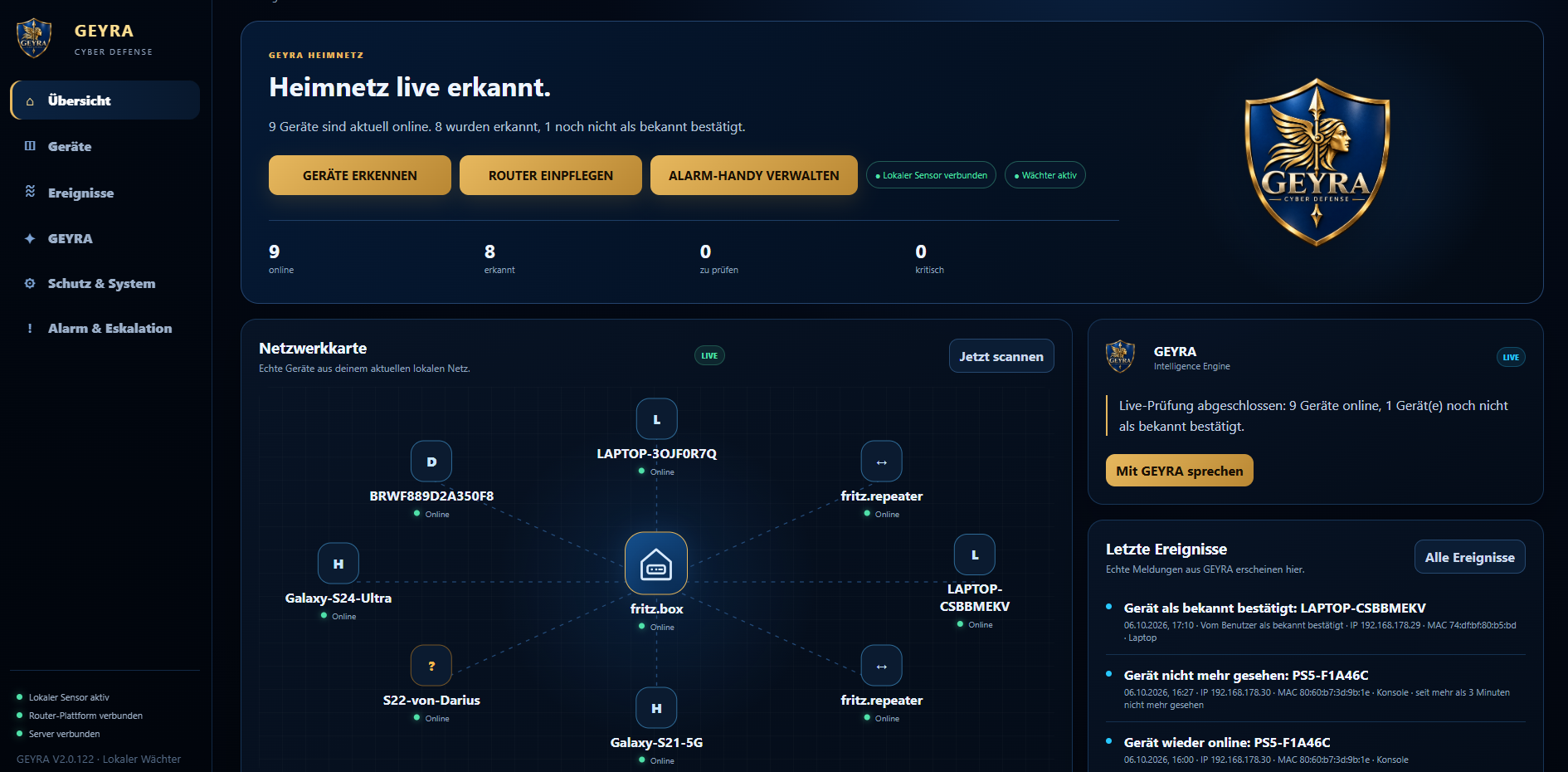
Your home network at a glance.
You see devices, router, connections, guardian status and important events directly in one overview.
Protected in three steps.
GEYRA is free. You only add Guardian if you want it.
Download for free
Download GEYRA for Windows – no purchase and no email needed. Beforehand you can check whether your router fits.
Install
GEYRA registers your household automatically, finds all devices and guides you through router and alarm phone.
Optional: add Guardian
The GEYRA server keeps watch even when your PC is off, and you block devices from your phone – even on the go.
Prices
GEYRA is free. You only pay for Guardian – if the GEYRA server should keep watch for you even when your PC is off.
Rule of thumb: PC on and at home = free. The GEYRA server works for you even when the PC is off, and you can step in on the go = Guardian.
Guardian is available for the FRITZ!Box. After purchase you can add Round-the-clock protection (defence even while your PC is off) with one button press on the FRITZ!Box. Free and Guardian compared:
Download GEYRA
Download GEYRA for Windows for free – no purchase and no email needed. At the first start GEYRA registers your household automatically.
GEYRA for Windows
Download GEYRA, install it and set up your home network.
Download for freeGEYRA for Android
With the free GEYRA app your smartphone becomes the alarm phone for your GEYRA household.
Set up alarm phone
Optional: Guardian
The GEYRA server keeps watch even when your PC is off – and you block devices from your phone, even on the go.
Help & guides
Installation, first setup, Android and common problems – explained step by step.