
- Check your router: is GEYRA right for me?
- Free or Guardian? What does GEYRA cost?
- Book Guardian
- Round-the-clock protection: defence even while the PC is off
- Alarm phone: sound, “Do not disturb” and full screen
- Paying with Link (Stripe)
- Enter the Guardian code (“I have already paid”)
- Receipt, invoice and bank statement “LINK.COM* GEYRA”
- Windows warning “Windows protected your PC”
- Install GEYRA
- Download GEYRA for free
- New PC: set up GEYRA again
- Remove / uninstall GEYRA
- First start: GEYRA ID and registration
- Recovery key: what is it for and where to keep it?
- First setup and first scan
- Understanding the overview
- Confirm and name devices
- Connect router
- Router password is not accepted
- Pair alarm phone
- Test the alarm
- Change or remove phone
- Block a device
- Allow a device / lift quarantine
- Protection levels OBSERVE, PROTECT, GUARDIAN
- Guardian rules and many alarms when switching on
- Quarantine for new devices
- Updates
- Troubleshooting
- Cancel the Guardian subscription
- Have your data deleted
- Nothing found – info@geyra.de
As much protection
as you want.
What the three protection levels do, what they need, what is free – and how the rules and quarantine for new devices work.
the network itself carries GEYRA.
The three protection levels
OBSERVE
Costs: nothing.
Needs: nothing else – works right away.
What GEYRA does: detects all devices, shows every change and warns you in GEYRA.
What GEYRA does not do: block, disconnect or change anything on the router.
PROTECT
Costs: nothing.
Needs: connected router and a reachable alarm phone.
What GEYRA does: reports new devices on the alarm phone and, if you wish, keeps them in quarantine – with an explanation beforehand. This works while your PC is running.
What GEYRA does not do: anything without your approval.
GUARDIAN
Costs: the Guardian subscription.
Needs: a FRITZ!Box, a reachable alarm phone and your rules. For defence while your PC is off, also Round-the-clock protection (one button press on the FRITZ!Box, your own FRITZ!Box password).
What GEYRA does: keeps watch around the clock via the GEYRA server – even when your PC is off – and acts according to the rules you have approved, up to the automatic defence.
What GEYRA does not do: anything outside your rules.
Choose a protection level
Click a protection level
On the overview under PROTECTION LEVEL click Observe, Protect or Guardian. GEYRA shows you exactly what happens at this level – and what doesn't.
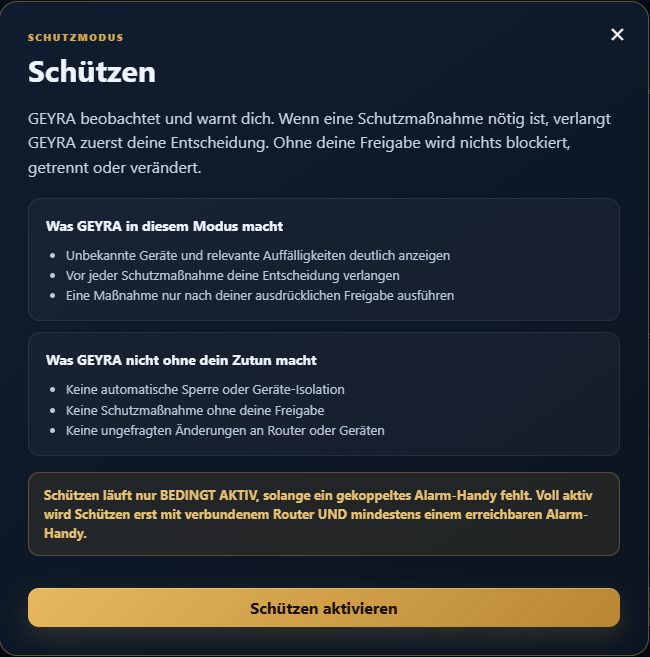
PROTECT: GEYRA asks before every action. Activate
Click the button to activate, for example Activate Protect or ACTIVATE GUARDIAN.
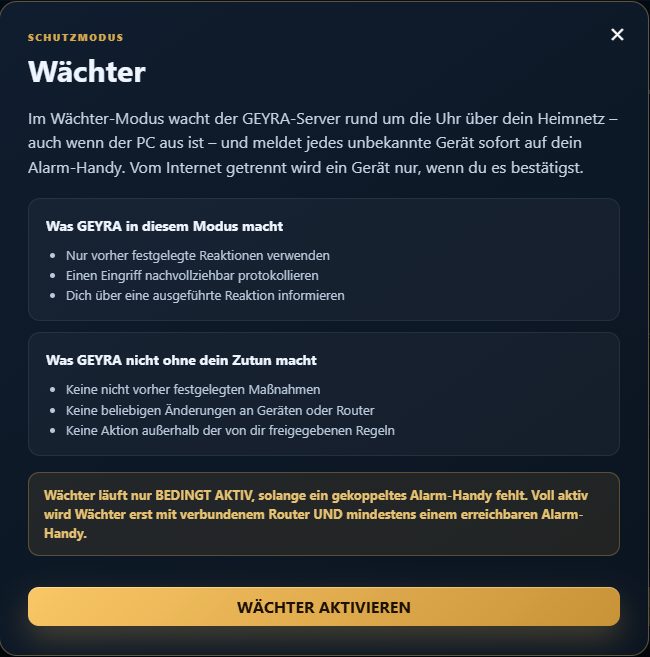
GUARDIAN: GEYRA watches even when the PC is off.
Rules
With the rules you decide in advance what GEYRA may do on its own. On the overview click Protect or Guardian – the window shows the rules and which of them are on.
Report unknown device
For every unknown device you immediately get an alarm on the alarm phone – even if GEYRA does not yet classify it as dangerous. In PROTECT and GUARDIAN.
Quarantine
New devices are cut off from the internet immediately until you allow them. In PROTECT and GUARDIAN – only after an explanation and your confirmation (see below).
Automatic defence
GEYRA disconnects suspicious devices from the internet by itself. Only in GUARDIAN and only with your express consent in the assistant. While your PC is off with Round-the-clock protection.
Quarantine for new devices
The strongest rule: if a device appears that GEYRA has never seen, it is cut off from the internet immediately until you allow it, and you get an alarm. Without Guardian this works while your PC is running; with Guardian the GEYRA server takes over even when the PC is off.
Requirement
“Report unknown device” is switched on, your router is connected and can block devices.
Read the explanation
When you switch on quarantine, GEYRA first explains in a window what happens. Only when you tick “I have read and understood the explanation.” can quarantine be switched on.
What happens then
All devices your router knows at that moment count as known. If a new device appears afterwards, it is disconnected and you get an alarm. On the PC the device shows “IN QUARANTINE”.
Allow
If it is your device, click ALLOW on the PC under Devices according to your router. With Guardian this also works on the phone under DEVICES IN THE HOME NETWORK. After that it never goes into quarantine again.
Who quarantine also affects
- Visitors and guests on the normal Wi-Fi
- new devices of your own, for example a new phone or a new TV
- Phones with a changing private address – for example after a restart, a Wi-Fi change or a hotspot
What never goes into quarantine
- Devices that were already there when you switched it on
- Devices on the FRITZ!Box guest Wi-Fi – they only trigger a notice
- FRITZ! devices such as repeaters and powerline adapters
- Devices you have allowed once
Safety limits
- At most 3 disconnections per hour, after that alarms only
- You always get an alarm – even if disconnecting does not work
- Switch off at any time