- Check your router: is GEYRA right for me?
- Free or Guardian? What does GEYRA cost?
- Book Guardian
- Round-the-clock protection: defence even while the PC is off
- Alarm phone: sound, “Do not disturb” and full screen
- Paying with Link (Stripe)
- Enter the Guardian code (“I have already paid”)
- Receipt, invoice and bank statement “LINK.COM* GEYRA”
- Windows warning “Windows protected your PC”
- Install GEYRA
- Download GEYRA for free
- New PC: set up GEYRA again
- Remove / uninstall GEYRA
- First start: GEYRA ID and registration
- Recovery key: what is it for and where to keep it?
- First setup and first scan
- Understanding the overview
- Confirm and name devices
- Connect router
- Router password is not accepted
- Pair alarm phone
- Test the alarm
- Change or remove phone
- Block a device
- Allow a device / lift quarantine
- Protection levels OBSERVE, PROTECT, GUARDIAN
- Guardian rules and many alarms when switching on
- Quarantine for new devices
- Updates
- Troubleshooting
- Cancel the Guardian subscription
- Have your data deleted
- Nothing found – info@geyra.de
Book Guardian
and unlock it.
GEYRA is free. Here you can read what happens when you book Guardian, when you need a Guardian code and what appears on your bank statement.
the network itself carries GEYRA.
1. Two ways to Guardian
Book in GEYRA (recommended)
In GEYRA on your PC click Unlock Guardian. GEYRA opens the booking on geyra.de with an identifier of your household. After payment Guardian is active for your household right away – you don't need to enter a code.
Book on geyra.de
You book under Book Guardian. After payment you receive a Guardian code (it looks like this: GEYRA-XXXX-XXXX-XXXX). You enter it in GEYRA – see Enter the Guardian code.
2. FRITZ!Box and Round-the-clock protection
Guardian is available for the FRITZ!Box. After purchase you can add Round-the-clock protection: GEYRA then blocks dangerous connections even while your PC is off. You press a button on your FRITZ!Box once.
3. Router check
Choose a plan
Under Book Guardian click Book Guardian monthly or Book Guardian yearly.
Click your router
Click your router. You'll find its name on the sticker on the bottom or back of the router. The payment buttons only appear for a FRITZ!Box. With other routers you pay nothing – you can use GEYRA there for free if your router is supported.
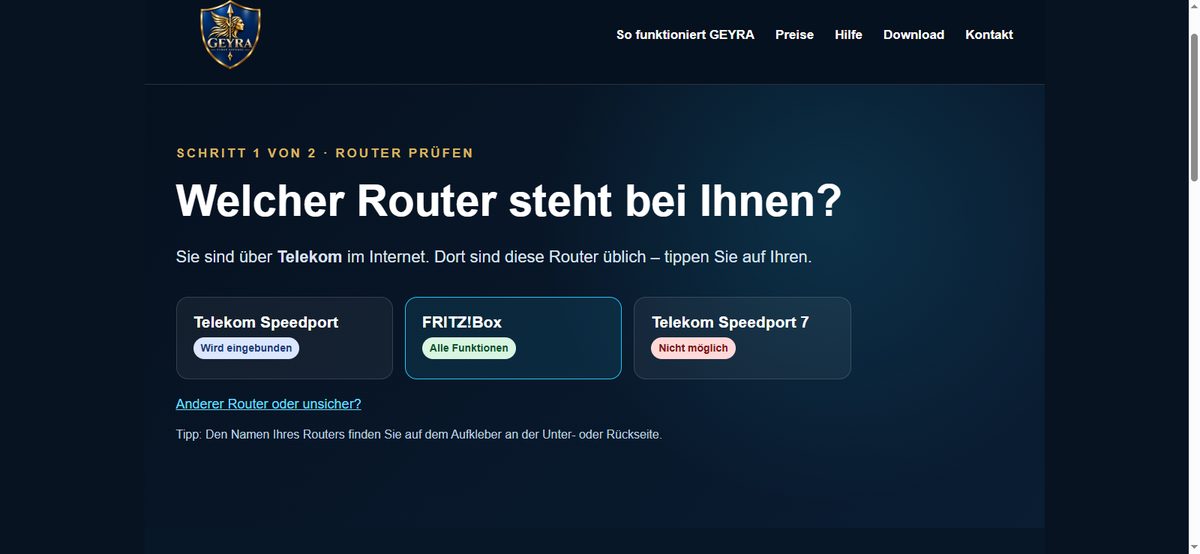
Router check: click your router. Accept the terms
Tick the box for our terms. Then click the button to pay.
4. Payment
The payment window
You pay securely via Link, the payment service of Stripe – for example by card, Apple Pay or Google Pay. Enter your email address. We will send the confirmation and – for a booking on the website – your Guardian code to this address.
“Confirm your identity”
If you have paid with Link before, Link sends you a code by text message. Enter it – or click Send code by email instead. This is a protection by Link, not by GEYRA. You can also close the window and enter your card details as usual.
5. After payment
The thank-you page
If you booked in GEYRA, it says: “Guardian is active for your household GEYRA-…” You don't need to enter anything. If you booked on the website, you see your Guardian code.
Optional: switch on Round-the-clock protection
After purchase GEYRA asks whether you want to switch on Round-the-clock protection – now or later. Click Switch on Round-the-clock protection. If your FRITZ!Box asks for confirmation, press the button the FRITZ!Box shows. You have 3 minutes for this.
6. Enter the Guardian code
Only needed if you booked on the website.
Install GEYRA
GEYRA not installed yet? First download it for free and install it, then enter the code.
Unlock Guardian
In GEYRA on your PC click Unlock Guardian and then I have already paid.
Enter the code
Enter the Guardian code from the email “Your GEYRA Guardian” (GEYRA-XXXX-XXXX-XXXX). Guardian is then unlocked for your household.
7. Receipt and bank statement
The receipt and invoice come in a separate email from Link (“Your receipt from GEYRA Cyber Defense”). Your bank statement shows “LINK.COM* GEYRA CYBER”. That is your payment for Guardian. You can manage your subscription or change the payment method via the link in that email or at link.com.